mirror of
https://github.com/rustdesk/rustdesk.git
synced 2026-03-02 19:26:56 -05:00
physical keyboard desktop -> mobile #1493
Labels
No labels
bug
documentation
duplicate
enhancement
enhancement
enhancement
good first issue
help wanted
invalid
question
unreproducible
wontfix
No milestone
No project
No assignees
1 participant

Notifications
Due date
No due date set.
Dependencies
No dependencies set.
Reference
starred/rustdesk-rustdesk#1493
Loading…
Add table
Add a link
Reference in a new issue
No description provided.
Delete branch "%!s()"
Deleting a branch is permanent. Although the deleted branch may continue to exist for a short time before it actually gets removed, it CANNOT be undone in most cases. Continue?
Originally created by @Orholt on GitHub (Mar 8, 2023).
Bug Description
Hi, keyboard used by client does not send keys into remote device.
Also, to be sure, I tested every key mapping from this list:
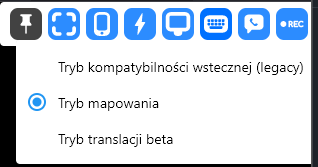
None worked
How to Reproduce
When I'm pressing any keys on my keyboard, for ex. when trying to type: google.com, when I'm pressing
g o o g l e . c o m, My android remote does not put those keys into a text field ( in my example, web browser search bar ).Expected Behavior
I should be able send my keyboard keys into remote with ease, so I could just type on my keyboard instead of remote virtual keyboard (ex. google keyboard, swiftkeys etc)
Operating system(s) on local side and remote side
Windows 11 -> Android
RustDesk Version(s) on local side and remote side
nightly -> nightly (
52ce3dd)Screenshots
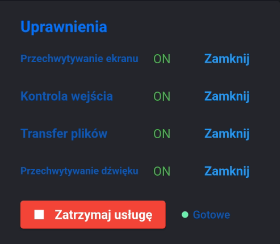
Permissions on remote:
Additional Context
Android device system info:
POCO F2 Pro, MIUI Global 13.0.3 (Stable)
Android 12 SKQ1.211006.001
Connection by self-hosted relay
@rustdesk commented on GitHub (Mar 8, 2023):
We can reopen this, if some one can figure out a solution.
@Orholt commented on GitHub (Mar 8, 2023):
btw, any idea why this is not working? I mean any clue?
@Orholt commented on GitHub (Mar 8, 2023):
I read about something called wifi keyboard, maybe it's possible to integrate it with rustdesk. I'll try to do it. Wish me luck @rustdesk
Here is repo, I guess it's same app
repo
@rustdesk commented on GitHub (Mar 8, 2023):
Interesting
@DonRichie commented on GitHub (Aug 3, 2023):
I am sorry, but I can't understand this answer. Is there a way to forward keyboard input to a controlled android device?
On my Android 13 device RustDesk is activated as accessibility app, but I can't enter keys, only mouse.
Do I miss something?
Linux -> Android 13
@Zhurama commented on GitHub (Aug 22, 2023):
Rustdesk Mobile really does... need hardware keyboard support. I was fortunate today that my Corsair KB has BT.. but that won't help remote sessions.. I hope you folks can figure it out.. I'm loving the service...
@xbyte99 commented on GitHub (Sep 12, 2023):
Somehow the TeamViewer guys made the remote keyboard (PC -> Android) working in their QuickSupport as well as in their Teamviewer Host App. So there's got to be a way.
It's especially bad when screen capturing is blocked (e.g. Password entry on lock screen and other apps). With the remote keyboard it would be at least still possible to type in the password and press enter (works in Teamviewer Quicksupport/Host) but on a blacked out screen with virtual keyboard - no chance.
@TheGrave commented on GitHub (Sep 23, 2023):
On the other hand I can't get an unlock prompt in TV QS/Host on Sony Xperia due a long known issue when Fingerprint unlock is enabled. That's why I decided to give Rustdesk a chance but hitting the same issue with lack of remote keyboard support really puts me off. Super cumbersome to type with a cursor.
@wrjcs commented on GitHub (Sep 26, 2023):
Can’t be resolved?
@rustdesk commented on GitHub (Sep 26, 2023):
/bounty $300
@algora-pbc[bot] commented on GitHub (Sep 26, 2023):
💎 $1,000 bounty created by wrjcs
💎 $300 bounty created by rustdesk
🙋 If you start working on this, comment
/attempt #3556to notify everyone👉 To claim this bounty, submit a pull request that includes the text
/claim #3556somewhere in its body📝 Before proceeding, please make sure you can receive payouts in your country
💵 Payment arrives in your account 2-5 days after the bounty is rewarded
💯 You keep 100% of the bounty award
🙏 Thank you for contributing to rustdesk/rustdesk!
@feliciien commented on GitHub (Sep 30, 2023):
/attempt #3556
Options
@feliciien commented on GitHub (Oct 5, 2023):
Hello the bug is only on windows 11 -> android
Or windows -> android
Or any desktop (MAC- pc) -> android ?
@xbyte99 commented on GitHub (Oct 5, 2023):
I can confirm this bug for windows 10 + 11
@feliciien commented on GitHub (Oct 5, 2023):
Thanks
@TheGrave commented on GitHub (Oct 6, 2023):
Ubuntu 20.04 as well.
@wrjcs commented on GitHub (Oct 13, 2023):
I can pay $1000 for this issue
Options
@rustdesk commented on GitHub (Oct 13, 2023):
How to pay?
@wrjcs commented on GitHub (Oct 13, 2023):
Paypal or other method?
@rustdesk commented on GitHub (Oct 13, 2023):
Great, you can pay to @feliciien directly once his PR is approved.
@wrjcs commented on GitHub (Oct 13, 2023):
No problem
@algora-pbc commented on GitHub (Oct 13, 2023):
@wrjcs would you like to add your bounty into the pool?
👉 https://algora.io/org/rustdesk/bounties/new
@wrjcs commented on GitHub (Oct 14, 2023):
How to add into the pool?
@algora-pbc commented on GitHub (Oct 14, 2023):
💎 $1,000 bounty has been added to pool by wrjcs!
@vanillabug commented on GitHub (Oct 16, 2023):
/attempt #3556
@feliciien commented on GitHub (Oct 18, 2023):
Still working on it
@mcfans commented on GitHub (Oct 19, 2023):
/attempt #3556
@feliciien commented on GitHub (Oct 24, 2023):
I would like to withdraw myself from this issue
@rustdesk commented on GitHub (Oct 24, 2023):
It is fine, since macfans almost finish this.
@Orholt commented on GitHub (Oct 25, 2023):
I'm glad that someone took care about this issue.
@uzmi1 commented on GitHub (Oct 29, 2023):
/attempt #3556
claim #3556
@algora-pbc[bot] commented on GitHub (Nov 7, 2023):
@mcfans: Your claim has been rewarded! 👉 Complete your Algora onboarding to collect the bounty.
@algora-pbc[bot] commented on GitHub (Nov 7, 2023):
🎉🎈 @mcfans has been awarded $300! 🎈🎊
@fragtion commented on GitHub (Nov 8, 2023):
Were there any other changes to the the Android apk (besides for this new feature) since 2023/11/07 build?
I was excited to try this new android keyboard functionality, but unfortunately 2023/11/08 build launches to a blank/black screen for me when opening the RustDesk app:
rustdesk-1.2.4-aarch64-signed.apk 2023/11/08 build (cffa3943aa8ea6ee7e53f262abc2f2f9):

I tried to uninstall and reinstall the app (Wipe app Data & Cache) but problem persists.
Same problem with the armv7 apk (d48801b52d7b558ca2b3f9b6ddeadf9f)
2023/11/07 nightly build worked fine on this device, so it's some change since yesterday that caused this
SM-910F with DeluxeROM (Android version 9, One UI version 1.0, Kernel version 4.4.111++DeluxeKernel_v17.1++)
@wrjcs commented on GitHub (Nov 8, 2023):
Hello @mcfans ,I have paid for this issue.

@algora-pbc[bot] commented on GitHub (Nov 8, 2023):
🎉🎈 @mcfans has been awarded $1,000! 🎈🎊
@mcfans commented on GitHub (Nov 8, 2023):
Hi @fragtion! I reproduced the same issue on my side. I got these logs from logcat.

I think it might be related with this commit.
@rustdesk commented on GitHub (Nov 9, 2023):
yes, fixed
@fragtion commented on GitHub (Nov 9, 2023):
Now this latest nightly is crashing for me on launch. "RustDesk keeps stopping"
Logcat:
11-09 17:06:51.800 20878 20901 W linker : Warning: "/data/app/com.carriez.flutter_hbb-SjyrFenMUxL-gImT3O202g==/lib/arm64/librustdesk.so" has unsupported flags DT_FLAGS_1=0x81 (ignoring unsupported flags)
11-09 17:06:51.952 20941 20941 F DEBUG : Abort message: 'called
Result::unwrap()on anErrvalue: GlobError { path: "/storage/emulated/0/RustDesk/Logs", error: Os { code: 13, kind: PermissionDenied, message: "Permission denied" } }'11-09 17:06:51.953 20941 20941 F DEBUG : #01 pc 00000000010d6ecc /data/app/com.carriez.flutter_hbb-SjyrFenMUxL-gImT3O202g==/lib/arm64/librustdesk.so (offset 0x55f000)
Update: fixed it by manually removing "/storage/emulated/0/RustDesk/" folder
Not sure if root is required for this, but I am rooted so it was easy for me
And the keyboard is working !! awesome
@rustdesk commented on GitHub (Nov 9, 2023):
@21pages follow up this
@basilgello commented on GitHub (Nov 9, 2023):
How do you get
/storage/emulated/0/RustDeskfolder created? I dont have it on all my devices.@rustdesk commented on GitHub (Nov 9, 2023):
@21pages need to check if
/storage/emulated/0exists. also find out the unwrap.@21pages commented on GitHub (Nov 11, 2023):
@fragtion If you can reproduce the error, could you try updating flexi_logger version to 0.27.3?
@wrjcs commented on GitHub (Nov 16, 2023):
when can we have this function?
@fragtion commented on GitHub (Nov 16, 2023):
The keyboard functionality for Android is already merged but you'll need to upgrade to the nightly version (v1.2.4) to use it as the last stable public version of RustDesk (v1.2.3) was released before this feature was added.
You can get the nightly here https://github.com/rustdesk/rustdesk/releases/tag/nightly
@TheGrave commented on GitHub (Nov 17, 2023):
Nightly is currently broken:
https://github.com/rustdesk/rustdesk/issues/6360
@Zahrun commented on GitHub (Nov 23, 2023):
Nightly is not broken anymore.
I tested this feature. It works, but it seems that it assumes the keyboard layout to be qwerty, whereas I am using something different. Also, it does not help to unlock the screen on Android side.
@TheGrave commented on GitHub (Nov 23, 2023):
This has been always working so another regression :D
@Zahrun commented on GitHub (Nov 23, 2023):
Which one, the keyboard layout or the unlock? By unlock I meant enter the android password. Maybe I was unclear.
@TheGrave commented on GitHub (Nov 23, 2023):
Unlocking has always worked. This is the main reason I started using RustDesk - you can unlock PIN or pattern, can't do it with anything else on Android and I tested them all, believe me. Problem is that stupid service crashes from time to time (or disables input control for no reason) so I ended up using TeamViewer Host as a backup when I need to re-enable it and I had to get rid of the screen lock after all. There is no single remote access app that is reliable enough to do it all on Android at present.
@rustdesk commented on GitHub (Nov 23, 2023):
How often? https://github.com/rustdesk/rustdesk/issues/6216
@rustdesk commented on GitHub (Nov 23, 2023):
Unlock work for you? Actually we do not enable unlock on android, because it does not work in our test.
github.com/rustdesk/rustdesk@34fa82f72c/src/server/video_service.rs (L367)@TheGrave commented on GitHub (Nov 23, 2023):
Dunno, I haven't timed it :) Almost every time I use it more than 20-30 mins.
@TheGrave commented on GitHub (Nov 23, 2023):
That's wierd. On Xperia 1, 5 and 1 III it works fine.
@Zahrun commented on GitHub (Nov 27, 2023):
My experience is that through rustdesk I can wake the phone, but then the PIN screen is hidden, it is all black. If I press the correct places on this black screen where the numbers should be shown, the phone unlocks. This behavior has been described in https://github.com/rustdesk/rustdesk/issues/816.
PS: I was hoping that the remote physical keyboard input would solve the guess work at unlock time
@TheGrave commented on GitHub (Dec 5, 2023):
Every time I use it for a while. 30 mins enough usually. Initially I thought it's a conflict with TeamViewer Host running at the same time (without screen recording launched from the latter). I tried removing Host app and RustDesk still crashes on its own.