qBittorrent 4.2.2 - UNC path downloads try to go to C:\Program Files\qBittorrent\[UNC path here] rather than just UNC Path #9939

Closed
opened 2026-02-21 20:28:03 -05:00 by deekerman · 58 comments
Owner

Originally created by @didyouexpectthat on GitHub (Mar 24, 2020).

Please provide the following information

qBittorrent version and Operating System

Windows 10 1909
Upgrade from 4.2.1 to 4.2.2 x64

What is the problem

Upgraded to 4.2.2. Upon reopening, qBittorrent mad that it can't find any of my torrent files from the network. "Errored: The filename, directory name, or volume label syntax is incorrect" -- all torrents were seeding without incident before the upgrade.
qBittorrent sending notifications to Windows, showing that is is trying to look for the files in C:\Program Files\qBittorrent(UNC path here) which is clearly not correct. All of my local torrents were not impacted. I moved to mapped network drives and not UNC paths and qBittorrent would force recheck some of them but not all of them.

What is the expected behavior

Upon upgrade, it should not screw up the location path of the non-local torrents.

Steps to reproduce

Have torrents at a UNC path \192.168.0.10\share\fileshere
Upgrade from 4.2.1 to 4.2.2.

Extra info(if any)

Only experienced this on 4.2.2 upgrade. I eventually closed and reopened and hit Start but I have a ton of torrents so it is a lot of rechecking.

Originally created by @didyouexpectthat on GitHub (Mar 24, 2020). **Please provide the following information** ### qBittorrent version and Operating System Windows 10 1909 Upgrade from 4.2.1 to 4.2.2 x64 ### What is the problem Upgraded to 4.2.2. Upon reopening, qBittorrent mad that it can't find any of my torrent files from the network. "Errored: The filename, directory name, or volume label syntax is incorrect" -- all torrents were seeding without incident before the upgrade. qBittorrent sending notifications to Windows, showing that is is trying to look for the files in C:\Program Files\qBittorrent\(UNC path here) which is clearly not correct. All of my local torrents were not impacted. I moved to mapped network drives and not UNC paths and qBittorrent would force recheck some of them but not all of them. ### What is the expected behavior Upon upgrade, it should not screw up the location path of the non-local torrents. ### Steps to reproduce Have torrents at a UNC path \\192.168.0.10\share\fileshere Upgrade from 4.2.1 to 4.2.2. ### Extra info(if any) Only experienced this on 4.2.2 upgrade. I eventually closed and reopened and hit Start but I have a ton of torrents so it is a lot of rechecking.
deekerman 2026-02-21 20:28:03 -05:00
Author
Owner

@SSoft7 commented on GitHub (Mar 24, 2020):

Same issue here. 👎

@SSoft7 commented on GitHub (Mar 24, 2020): Same issue here. 👎
Author
Owner

@kfonda commented on GitHub (Mar 24, 2020):

Same here...

@kfonda commented on GitHub (Mar 24, 2020): Same here...
Author
Owner

@jameskolme commented on GitHub (Mar 24, 2020):

...aaaannnnddd here.

@jameskolme commented on GitHub (Mar 24, 2020): ...aaaannnnddd here.
Author
Owner

@wellloaded commented on GitHub (Mar 24, 2020):

Same issue here, all the already downloaded torrents are red/failed after the latest upgrade.
Downgrading to 4.2.1...

@wellloaded commented on GitHub (Mar 24, 2020): Same issue here, all the already downloaded torrents are red/failed after the latest upgrade. Downgrading to 4.2.1...
Author
Owner

@ghost commented on GitHub (Mar 24, 2020):

I believe I have the same issue. I also tried reverting back to 4.2.1 and the error persists for me.

Edit: To be clear, after reverting to 4.2.1, instead of the "Errored:" status, it instead hangs on "Checking resume data".

The only fix I found at the moment was deleting and readding the torrent. This is not a good fix for someone (like me) with a large amount of torrents to replace.

@ghost commented on GitHub (Mar 24, 2020): I believe I have the same issue. I also tried reverting back to 4.2.1 and the error persists for me. Edit: To be clear, after reverting to 4.2.1, instead of the "Errored:" status, it instead hangs on "Checking resume data". The only fix I found at the moment was deleting and readding the torrent. This is not a good fix for someone (like me) with a large amount of torrents to replace.
Author
Owner

@kfonda commented on GitHub (Mar 24, 2020):

I added a new torrent and it downloaded fine, but when I shutdown and restarted qBittorrent it failed to seed with the same error.

@kfonda commented on GitHub (Mar 24, 2020): I added a new torrent and it downloaded fine, but when I shutdown and restarted qBittorrent it failed to seed with the same error.
Author
Owner

@FranciscoPombal commented on GitHub (Mar 24, 2020):

@an0n666 could this be related to the long path-aware change?

@FranciscoPombal commented on GitHub (Mar 24, 2020): @an0n666 could this be related to the long path-aware change?
Author
Owner

@ghost commented on GitHub (Mar 24, 2020):

Not sure how longpath aware thing can cause this. Someone will have to change the manifest and test.

@ghost commented on GitHub (Mar 24, 2020): Not sure how longpath aware thing can cause this. Someone will have to change the manifest and test.
Author
Owner

@didyouexpectthat commented on GitHub (Mar 24, 2020):

If there's something I can edit on my side to get more details, please let me know which specific file to manipulate. I am not setup to build binaries on Windows though at this time.

@didyouexpectthat commented on GitHub (Mar 24, 2020): If there's something I can edit on my side to get more details, please let me know which specific file to manipulate. I am not setup to build binaries on Windows though at this time.
Author
Owner

@ytsejam1138 commented on GitHub (Mar 24, 2020):

Same issue here. Qbit running on Windows 10 saving torrents to a shared folder on my Synology NAS

@ytsejam1138 commented on GitHub (Mar 24, 2020): Same issue here. Qbit running on Windows 10 saving torrents to a shared folder on my Synology NAS
Author
Owner

@Hsenag59 commented on GitHub (Mar 24, 2020):

Same problem here installed on windows 7 computer, save to a UNC path on synology NAS on my LAN. Message is "Errored: The filename, directory name, or volume label syntax is incorrect", revert to 4.2.1 solve problem except for the torrent I try to modify on 4.2.2

All path problems solved with 4.2.3 installation, lots of thanks for that

@Hsenag59 commented on GitHub (Mar 24, 2020): Same problem here installed on windows 7 computer, save to a UNC path on synology NAS on my LAN. Message is "Errored: The filename, directory name, or volume label syntax is incorrect", revert to 4.2.1 solve problem except for the torrent I try to modify on 4.2.2 All path problems solved with 4.2.3 installation, lots of thanks for that
Author
Owner

@atldsgnr commented on GitHub (Mar 24, 2020):

I noticed that when I click "set location" it opens up the original directory with no problem. It just fails with the "open destination folder"

@atldsgnr commented on GitHub (Mar 24, 2020): I noticed that when I click "set location" it opens up the original directory with no problem. It just fails with the "open destination folder"
Author
Owner

@jbruchon commented on GitHub (Mar 24, 2020):

This is happening to me too. Additionally, I downgraded to 4.2.1 and all my torrents are now having the same problem, so whatever 4.2.2 did, it hosed ALL my torrent UNC save paths.

EDIT WITH FIX: I was able to fix my FASTRESUME files using this from MSYS2 in %localappdata%\qBittorrent\BT_Backup:

sed -i 's#C:\\Program Files\\qBittorrent\\##' *.fastresume

But while 4.2.2 didn't patch the FASTRESUME files again, it DID automatically prefix the executable's path when attempting to access UNC paths, so I had to downgrade to 4.2.1 to keep going. Once I fixed the files and downgraded, all my torrents magically picked up just fine.

@jbruchon commented on GitHub (Mar 24, 2020): This is happening to me too. Additionally, I downgraded to 4.2.1 and all my torrents are now having the same problem, so whatever 4.2.2 did, it hosed ALL my torrent UNC save paths. **EDIT WITH FIX:** I was able to fix my FASTRESUME files using this from MSYS2 in `%localappdata%\qBittorrent\BT_Backup`: `sed -i 's#C:\\Program Files\\qBittorrent\\##' *.fastresume` But while 4.2.2 didn't patch the FASTRESUME files again, it DID automatically prefix the executable's path when attempting to access UNC paths, so I had to downgrade to 4.2.1 to keep going. Once I fixed the files and downgraded, all my torrents magically picked up just fine.
Author
Owner

@didyouexpectthat commented on GitHub (Mar 24, 2020):

qBittorrent was stuck on "checking" the files again but it wasn't doing anything. I tried what @jbruchon said was the fix but on 4.2.2.... and as a result, all of my UNC torrents disappeared on restart of qBittorrent 😂😂 Well, there's that...

From the fastresume file:
save_path59:C:\Program Files\qBittorrent\//172.31.5.252/path/to/content/9:

@didyouexpectthat commented on GitHub (Mar 24, 2020): qBittorrent was stuck on "checking" the files again but it wasn't doing anything. I tried what @jbruchon said was the fix but on 4.2.2.... and as a result, all of my UNC torrents disappeared on restart of qBittorrent 😂😂 Well, there's that... From the fastresume file: `save_path59:C:\Program Files\qBittorrent\//172.31.5.252/path/to/content/9:`
Author
Owner

@jbruchon commented on GitHub (Mar 24, 2020):

@didyouexpectthat always back up before using sed, my friend

@jbruchon commented on GitHub (Mar 24, 2020): @didyouexpectthat always back up before using sed, my friend
Author
Owner

@didyouexpectthat commented on GitHub (Mar 24, 2020):

😂 I'm not too worried about it. I know how destructive sed is. I'll just readd them after this problem is fixed.

@didyouexpectthat commented on GitHub (Mar 24, 2020): 😂 I'm not too worried about it. I know how destructive sed is. I'll just readd them after this problem is fixed.
Author
Owner

@ghost commented on GitHub (Mar 24, 2020):

Comment/delete lines 40-44 and build qbt.

github.com/qbittorrent/qBittorrent@fcc87b4e9b/src/qbittorrent.exe.manifest (L40)

Maybe @sledgehammer999 can provide build for windows.

@ghost commented on GitHub (Mar 24, 2020): Comment/delete lines 40-44 and build qbt. https://github.com/qbittorrent/qBittorrent/blob/fcc87b4e9b8f1b46a9b5316e31416e2a431ad5cc/src/qbittorrent.exe.manifest#L40 Maybe @sledgehammer999 can provide build for windows.
Author
Owner

@ghost commented on GitHub (Mar 25, 2020):

Same problem here installed on windows 7 computer, save to a UNC path on synology NAS on my LAN. Message is "Errored: The filename, directory name, or volume label syntax is incorrect", revert to 4.2.1 solve problem except for the torrent I try to modify on 4.2.2

@FranciscoPombal windows 7 should have no effect with the long path enabled right? It supports only Win10 1607 and later. Maybe it’s not related to long path afterall.

@ghost commented on GitHub (Mar 25, 2020): > Same problem here installed on windows 7 computer, save to a UNC path on synology NAS on my LAN. Message is "Errored: The filename, directory name, or volume label syntax is incorrect", revert to 4.2.1 solve problem except for the torrent I try to modify on 4.2.2 @FranciscoPombal windows 7 should have no effect with the long path enabled right? It supports only Win10 1607 and later. Maybe it’s not related to long path afterall.
Author
Owner

@SSoft7 commented on GitHub (Mar 25, 2020):

I don't think it's related to long path at all. It's about UNC Paths like \\tsclient\D
I have reverted back to 4.2.1 and everything is back to normal.

@SSoft7 commented on GitHub (Mar 25, 2020): I don't think it's related to long path at all. It's about UNC Paths like `\\tsclient\D` I have reverted back to 4.2.1 and everything is back to normal.
Author
Owner

@ghost commented on GitHub (Mar 25, 2020):

I think this PR is responsible https://github.com/qbittorrent/qBittorrent/pull/11785

@Tester798 @glassez @FranciscoPombal

@ghost commented on GitHub (Mar 25, 2020): I think this PR is responsible https://github.com/qbittorrent/qBittorrent/pull/11785 @Tester798 @glassez @FranciscoPombal
Author
Owner

@glassez commented on GitHub (Mar 25, 2020):

I think this PR is responsible #11785

I think Yes. Seems UNC paths are incorrectly detected as "relative".

@glassez commented on GitHub (Mar 25, 2020): >I think this PR is responsible #11785 I think Yes. Seems UNC paths are incorrectly detected as "relative".
Author
Owner

@ghost commented on GitHub (Mar 25, 2020):

This will require an urgent patch otherwise everyone that using UNC path, fastresumes would be messed up. I think @sledgehammer999 should halt the windows release.

@ghost commented on GitHub (Mar 25, 2020): This will require an urgent patch otherwise everyone that using UNC path, fastresumes would be messed up. I think @sledgehammer999 should halt the windows release.
Author
Owner

@FranciscoPombal commented on GitHub (Mar 25, 2020):

@glassez @an0n666
I think I know what the problem is. On Windows, a path starting with \ is not the same as a path starting with \\, which is a UNC path.

I don't believe the converting relative save_path to absolute part at https://github.com/qbittorrent/qBittorrent/pull/11785 takes this into account.

Also there seems to be at least another mistake, in const int end = patchedFastresumeData.indexOf(':', start);, because a Windows path can have : in the middle (see https://docs.microsoft.com/en-us/openspecs/windows_protocols/ms-dtyp/62e862f4-2a51-452e-8eeb-dc4ff5ee33cc)

This bit needs fixing and should probably not do its own bencode parsing.
I can't do it right now and can't test Windows unfortunately.

@FranciscoPombal commented on GitHub (Mar 25, 2020): @glassez @an0n666 I think I know what the problem is. On Windows, a path starting with `\` is not the same as a path starting with `\\`, which is a UNC path. I don't believe the `converting relative save_path to absolute` part at https://github.com/qbittorrent/qBittorrent/pull/11785 takes this into account. Also there seems to be at least another mistake, in `const int end = patchedFastresumeData.indexOf(':', start);`, because a Windows path can have `:` in the middle (see https://docs.microsoft.com/en-us/openspecs/windows_protocols/ms-dtyp/62e862f4-2a51-452e-8eeb-dc4ff5ee33cc) This bit needs fixing and should probably not do its own bencode parsing. I can't do it right now and can't test Windows unfortunately.
Author
Owner

@ghost commented on GitHub (Mar 25, 2020):

What abt the users that ended up with wrong paths in fast resume? You have to provide a fix for that. Atleast for the next version.

@ghost commented on GitHub (Mar 25, 2020): What abt the users that ended up with wrong paths in fast resume? You have to provide a fix for that. Atleast for the next version.
Author
Owner

@glassez commented on GitHub (Mar 25, 2020):

Also there seems to be at least another mistake, in const int end = patchedFastresumeData.indexOf(':', start);, because a Windows path can have : in the middle

It's unrelated to this issue since this code is from libtorrent-1.1 related branch.
Also this code is correct since ':' you're talking about isn't part of string but a delimiter between string length and string characters.

@glassez commented on GitHub (Mar 25, 2020): >Also there seems to be at least another mistake, in `const int end = patchedFastresumeData.indexOf(':', start);`, because a Windows path can have `:` in the middle It's unrelated to this issue since this code is from libtorrent-1.1 related branch. Also this code is correct since ':' you're talking about isn't part of string but a delimiter between string length and string characters.
Author
Owner

@FranciscoPombal commented on GitHub (Mar 25, 2020):

It's unrelated to this issue since this code is from libtorrent-1.1 related branch.
Also this code is correct since ':' you're talking about isn't part of string but a delimiter between string length and string characters.

I see. Well, guess we need someone with access to a Windows machine and a similar setup to git bisect this or something.

@FranciscoPombal commented on GitHub (Mar 25, 2020): > It's unrelated to this issue since this code is from libtorrent-1.1 related branch. > Also this code is correct since ':' you're talking about isn't part of string but a delimiter between string length and string characters. I see. Well, guess we need someone with access to a Windows machine and a similar setup to git bisect this or something.
Author
Owner

@glassez commented on GitHub (Mar 25, 2020):

What is most strange is that it should not affect paths if "relative fastresume" option is not enabled...

@glassez commented on GitHub (Mar 25, 2020): What is most strange is that it should not affect paths if "relative fastresume" option is not enabled...
Author
Owner

@jameskolme commented on GitHub (Mar 25, 2020):

Small helpful hint: after going back to 4.2.1there was still huge load of errors, going further to 4.2.0 and 3/4 errored ones seems to be going back. Takes ages to check doh!

No idea how or where these are stored, but some sort of database maintenance tool seems like good idea. /nonsense

@jameskolme commented on GitHub (Mar 25, 2020): Small helpful hint: after going back to 4.2.1there was still huge load of errors, going further to 4.2.0 and 3/4 errored ones seems to be going back. Takes ages to check doh! No idea how or where these are stored, but some sort of database maintenance tool seems like good idea. /nonsense
Author
Owner

@Tester798 commented on GitHub (Mar 25, 2020):

Looks like indeed the bug is happening because of line github.com/qbittorrent/qBittorrent@fcc87b4e9b/src/base/bittorrent/session.cpp (L2283) (and probably github.com/qbittorrent/qBittorrent@fcc87b4e9b/src/base/bittorrent/session.cpp (L2111)) introduced in https://github.com/qbittorrent/qBittorrent/pull/11785.
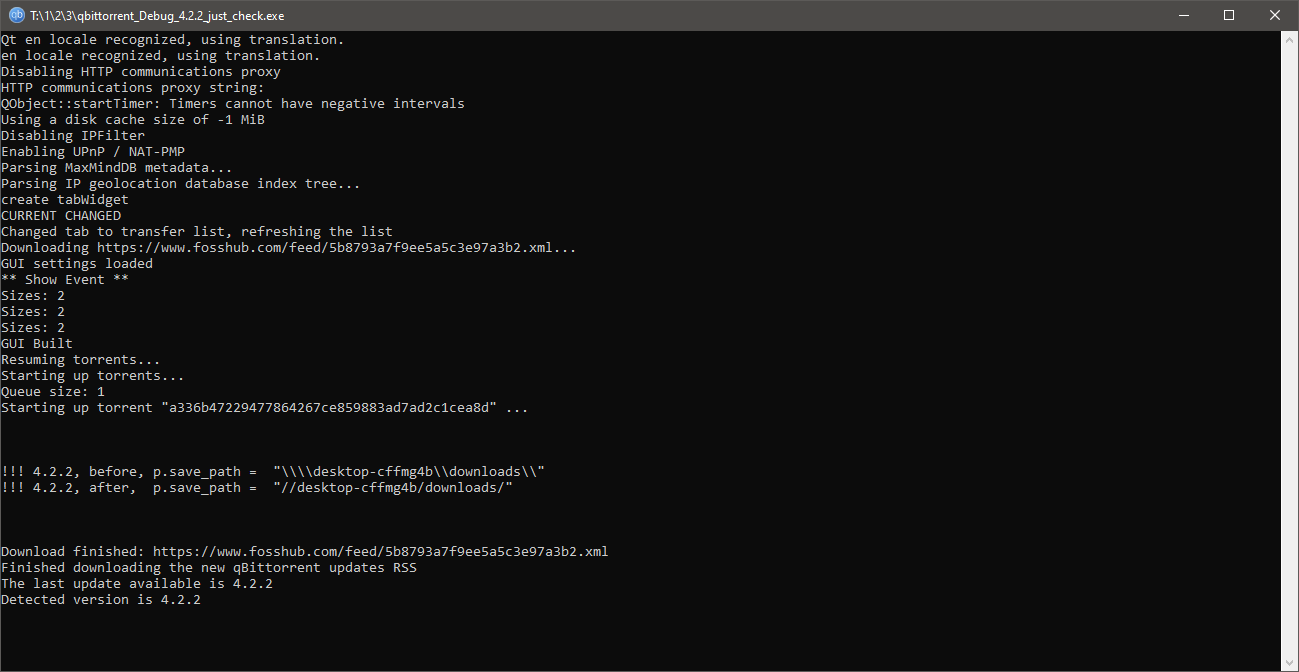
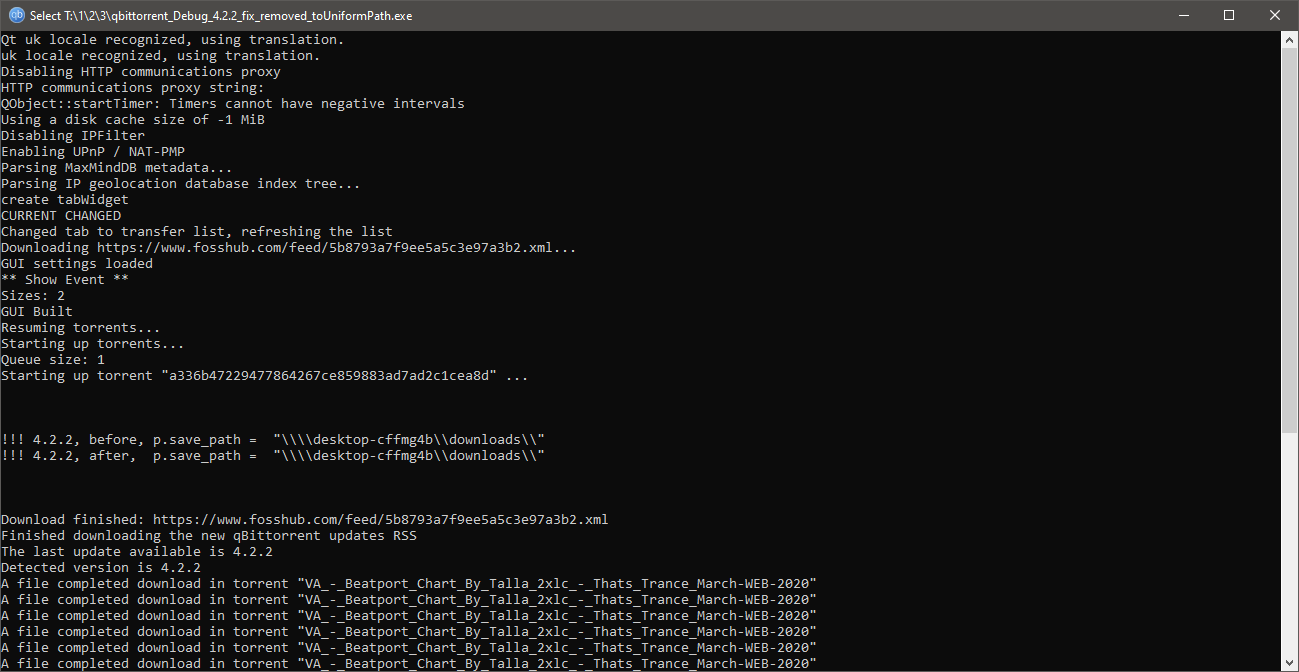
After Utils::Fs::toUniformPath (which is actually QDir::fromNativeSeparators from github.com/qbittorrent/qBittorrent@fcc87b4e9b/src/base/utils/fs.cpp (L68-L71)) the slashes in path are changed from \ to /:
image

If I remove Utils::Fs::toUniformPath from that line the path looks the same if it's network path (and portable paths seem to be converted fine too):
image

Checked also in Ubuntu and seems like it's working fine without Utils::Fs::toUniformPath, so maybe we don't need it there?

@Tester798 commented on GitHub (Mar 25, 2020): Looks like indeed the bug is happening because of line https://github.com/qbittorrent/qBittorrent/blob/fcc87b4e9b8f1b46a9b5316e31416e2a431ad5cc/src/base/bittorrent/session.cpp#L2283 (and probably https://github.com/qbittorrent/qBittorrent/blob/fcc87b4e9b8f1b46a9b5316e31416e2a431ad5cc/src/base/bittorrent/session.cpp#L2111) introduced in https://github.com/qbittorrent/qBittorrent/pull/11785. After `Utils::Fs::toUniformPath` (which is actually `QDir::fromNativeSeparators` from https://github.com/qbittorrent/qBittorrent/blob/fcc87b4e9b8f1b46a9b5316e31416e2a431ad5cc/src/base/utils/fs.cpp#L68-L71) the slashes in path are changed from `\` to `/`: ![image](https://user-images.githubusercontent.com/8844478/77572719-24f13400-6ed8-11ea-8695-26b049c1fb8a.png) If I remove `Utils::Fs::toUniformPath` from that line the path looks the same if it's network path (and portable paths seem to be converted fine too): ![image](https://user-images.githubusercontent.com/8844478/77573245-0ccde480-6ed9-11ea-810a-6d32ca1a26c5.png) Checked also in Ubuntu and seems like it's working fine without `Utils::Fs::toUniformPath`, so maybe we don't need it there?
Author
Owner

@Tester798 commented on GitHub (Mar 25, 2020):

Here is 4.2.2 debug build with Utils::Fs::toUniformPath removed.
If ppl with the problem could test this it would be nice. But don't forget to backup your qBittorrent profile folder (or just use portable mode for testing).

@Tester798 commented on GitHub (Mar 25, 2020): [Here](https://mega.nz/#!HQ9CEKhQ!0ekejB_1CSJU9VJambSVf8awsOvbCn9ihMV-72xbJDc) is 4.2.2 debug build with `Utils::Fs::toUniformPath` removed. If ppl with the problem could test this it would be nice. But don't forget to backup your qBittorrent profile folder (or just use portable mode for testing).
Author
Owner

@Ryrynz commented on GitHub (Mar 25, 2020):

@sledgehammer999 Will there be a quick 4.2.3 release to fix this and other small issues that have been introduced recently?

@Ryrynz commented on GitHub (Mar 25, 2020): @sledgehammer999 Will there be a quick 4.2.3 release to fix this and other small issues that have been introduced recently?
Author
Owner

@jameskolme commented on GitHub (Mar 27, 2020):

4.2.2 debug build seems to work and can recover remaining errors, disaster avoided.

@jameskolme commented on GitHub (Mar 27, 2020): 4.2.2 debug build seems to work and can recover remaining errors, disaster avoided.
Author
Owner

@sledgehammer999 commented on GitHub (Mar 27, 2020):

@Ryrynz once its fixed.

@sledgehammer999 commented on GitHub (Mar 27, 2020): @Ryrynz once its fixed.
Author
Owner

@ghost commented on GitHub (Mar 27, 2020):

Debug build didn't seem to work for me - for torrents that were already affected by the current 4.2.2 bug.

@ghost commented on GitHub (Mar 27, 2020): Debug build didn't seem to work for me - for torrents that were already affected by the current 4.2.2 bug.
Author
Owner

@ghost commented on GitHub (Mar 27, 2020):

Debug build didn't seem to work for me - for torrents that were already affected by the current 4.2.2 bug.

The patch it includes isn’t supposed to fix the fastresume files that got messed up by 4.2.2 release.

@ghost commented on GitHub (Mar 27, 2020): > Debug build didn't seem to work for me - for torrents that were already affected by the current 4.2.2 bug. The patch it includes isn’t supposed to fix the fastresume files that got messed up by 4.2.2 release.
Author
Owner

@sledgehammer999 commented on GitHub (Mar 27, 2020):

Debug build didn't seem to work for me - for torrents that were already affected by the current 4.2.2 bug.

@AreYouDeeWhy let's help @Tester798 a bit. Locate the fastresume of one of your torrents that has the problem. Then decode it here: https://chocobo1.github.io/bencode_online/
Share what you see as saved path in the fastresume. The string format may help us to reverse the problem.

@sledgehammer999 commented on GitHub (Mar 27, 2020): >Debug build didn't seem to work for me - for torrents that were already affected by the current 4.2.2 bug. @AreYouDeeWhy let's help @Tester798 a bit. Locate the fastresume of one of your torrents that has the problem. Then decode it here: https://chocobo1.github.io/bencode_online/ Share what you see as saved path in the fastresume. The string format may help us to reverse the problem.
Author
Owner

@ghost commented on GitHub (Mar 27, 2020):

The path would be
C:\Program Files\qBittorrent\unc path for x64 build and
C:\Program Files (x86)\qBittorrent\unc for x86 build.

@ghost commented on GitHub (Mar 27, 2020): The path would be C:\Program Files\qBittorrent\unc path for x64 build and C:\Program Files (x86)\qBittorrent\unc for x86 build.
Author
Owner

@glassez commented on GitHub (Mar 27, 2020):

The path would be
C:\Program Files\qBittorrent\unc path for x64 build and
C:\Program Files (x86)\qBittorrent\unc for x86 build.

or any other path if user installed qBittorrent in non default location.

@glassez commented on GitHub (Mar 27, 2020): > The path would be > C:\Program Files\qBittorrent\unc path for x64 build and > C:\Program Files (x86)\qBittorrent\unc for x86 build. or any other path if user installed qBittorrent in non default location.
Author
Owner

@ghost commented on GitHub (Mar 27, 2020):

Atleast it should be fixed for people who keep it default. Not many people install apps outside of these directories anyway.

@ghost commented on GitHub (Mar 27, 2020): Atleast it should be fixed for people who keep it default. Not many people install apps outside of these directories anyway.
Author
Owner

@jbruchon commented on GitHub (Mar 27, 2020):

On Windows, scan existing paths for double forward slashes and assume that the double forward slashes indicate a damaged UNC path to correct. The program path added has backslashes and the UNC path following it has forward slashes. This should be a completely safe way to patch all damaged fast resume files without knowing the program path that got baked into them by mistake.

@jbruchon commented on GitHub (Mar 27, 2020): On Windows, scan existing paths for double forward slashes and assume that the double forward slashes indicate a damaged UNC path to correct. The program path added has backslashes and the UNC path following it has forward slashes. This should be a completely safe way to patch all damaged fast resume files without knowing the program path that got baked into them by mistake.
Author
Owner

@ghost commented on GitHub (Mar 27, 2020):

What we have for one of the fastresumes of affected the torrents is:

    "qBt-savePath": "Z:\\file\\path\\",

    "save_path": "C:\\Program Files\\qBittorrent\\//server/downloads/incomplete/",

the Z drive is a mapped drive on a NAS. I use an incomplete downloads setting for qBittorrent which is also on the same NAS which the mapped Z drive is on, so C:\\Program Files\\qBittorrent\\ isn't meant to be there.

I would also like to add that this is a torrent that has not been started yet (0.0% complete). So nothing has yet been written in regards to this specific torrent.

@ghost commented on GitHub (Mar 27, 2020): What we have for one of the fastresumes of affected the torrents is: ``` "qBt-savePath": "Z:\\file\\path\\", "save_path": "C:\\Program Files\\qBittorrent\\//server/downloads/incomplete/", ``` the Z drive is a mapped drive on a NAS. I use an incomplete downloads setting for qBittorrent which is also on the same NAS which the mapped Z drive is on, so `C:\\Program Files\\qBittorrent\\` isn't meant to be there. I would also like to add that this is a torrent that has not been started yet (0.0% complete). So nothing has yet been written in regards to this specific torrent.
Author
Owner

@jbruchon commented on GitHub (Mar 27, 2020):

    "save_path": "C:\\Program Files\\qBittorrent\\//server/downloads/incomplete/",

See, the slash direction change and the double forward slash // is an excellent heuristic to detect the damaged paths and correct them, at least for save_path; if qBt-savePath (which apparently normally uses backslashes) is damaged, it should still have a string of excessive backslashes due to the UNC path being spliced after the program path.

@jbruchon commented on GitHub (Mar 27, 2020): > ``` > "save_path": "C:\\Program Files\\qBittorrent\\//server/downloads/incomplete/", > ``` See, the slash direction change and the double forward slash `//` is an excellent heuristic to detect the damaged paths and correct them, at least for `save_path`; if `qBt-savePath` (which apparently normally uses backslashes) is damaged, it should still have a string of excessive backslashes due to the UNC path being spliced after the program path.
Author
Owner

@jameskolme commented on GitHub (Mar 27, 2020):

This works for me:
4.2.2 debug built fixes things, but needs to apply on every file that is "broken".

  1. set DL location to anywhere but current, apply and wait few seconds/minutes to take effect.
  2. set DL location back where it was and wohoo, one by one checking will start.
@jameskolme commented on GitHub (Mar 27, 2020): This works for me: 4.2.2 debug built fixes things, but needs to apply on every file that is "broken". 1. set DL location to anywhere but current, apply and wait few seconds/minutes to take effect. 2. set DL location back where it was and wohoo, one by one checking will start.
Author
Owner

@jbruchon commented on GitHub (Mar 27, 2020):

@jameskolme That's fine for a few torrents, or torrents stored in a few places, but some of us have moved hundreds of completed torrents into directory hierarchies and it would be a massive pain to shuffle each individual one around to fix this. For people with a really simple set of save paths, though, your solution is definitely a good way to avoid the long wait for a proper technical fix.

@jbruchon commented on GitHub (Mar 27, 2020): @jameskolme That's fine for a few torrents, or torrents stored in a few places, but some of us have moved hundreds of completed torrents into directory hierarchies and it would be a massive pain to shuffle each individual one around to fix this. For people with a really simple set of save paths, though, your solution is definitely a good way to avoid the long wait for a proper technical fix.
Author
Owner

@jameskolme commented on GitHub (Mar 27, 2020):

@jbruchon Well I have hierarchy, going just one full category at a time, you can easily select full category/folder, at least I can. No need to click one file by file. Actual files keeps where they should, so this is more like database maintenance using hard way around. This is day 3 for checking...

Master tool to fix and clean things like this would be nice.

@jameskolme commented on GitHub (Mar 27, 2020): @jbruchon Well I have hierarchy, going just one full category at a time, you can easily select full category/folder, at least I can. No need to click one file by file. Actual files keeps where they should, so this is more like database maintenance using hard way around. This is day 3 for checking... Master tool to fix and clean things like this would be nice.
Author
Owner

@FranciscoPombal commented on GitHub (Mar 27, 2020):

To fix already-broken .fastresumes, the best way would probably be an automated programmatic solution by using the webapi, but unfortunately, it cannot change save paths of torrents that are already added. Let's hope the mangling has a pattern, at least that way a one-off tool can be made to fix the paths automatically in every .fastresume.

@FranciscoPombal commented on GitHub (Mar 27, 2020): To fix already-broken `.fastresumes`, the best way would probably be an automated programmatic solution by using the webapi, but unfortunately, it cannot change save paths of torrents that are already added. Let's hope the mangling has a pattern, at least that way a one-off tool can be made to fix the paths automatically in every `.fastresume`.
Author
Owner

@Tester798 commented on GitHub (Mar 27, 2020):

I'm sorry guys that my PR caused problems for you, I hope the fix will solve it.

The strange part is that for some reason I'm not even able to get those download locations like
"save_path": "C:\\Program Files\\qBittorrent\\//server/downloads/incomplete/"
in my fastresume file whatever I'm trying to do.
I'm always getting locations with \ slashes (backslashes) in my fastresume file when it's mapped drive or network location. So for me it's only in qBittorrent itself torrent is getting errored, and after I go back to 4.2.1 or fixed-debug 4.2.2 torrent continue to download or seed normally again.

So now I'm not even sure what exactly made qBittorrent produce these broken fastresume files. If ppl who have this strange paths in their fastresume files (@AreYouDeeWhy and maybe others) could provide their %USERPROFILE%\AppData\Roaming\qBittorrent\qBittorrent.ini settings file and sample fastresume+torrent files located in %USERPROFILE%\AppData\Local\qBittorrent\BT_backup (for example 32be5e757a770af2cfb9f0f4fe11de9a975495ed.fastresume +
32be5e757a770af2cfb9f0f4fe11de9a975495ed.torrent files) then maybe it will help to find what is causing this fastresume files corruption, but I'm still not sure if I will be able to reproduce the issue.

Made some quick fix for fastresume files in go, you can download it from here: https://github.com/Tester798/fix_fastresume/releases
Put it in your %USERPROFILE%\AppData\Local\qBittorrent\BT_backup folder near fastresume files and run it from command line to get them patched. Don't forget to make backup of your fastresume files before the patch in case if something goes wrong.
It should delete everthing before // in save_path and then replace all / symbols with \.

@Tester798 commented on GitHub (Mar 27, 2020): I'm sorry guys that my PR caused problems for you, I hope the fix will solve it. The strange part is that for some reason I'm not even able to get those download locations like `"save_path": "C:\\Program Files\\qBittorrent\\//server/downloads/incomplete/"` in my fastresume file whatever I'm trying to do. I'm always getting locations with `\` slashes (backslashes) in my fastresume file when it's mapped drive or network location. So for me it's only in qBittorrent itself torrent is getting errored, and after I go back to 4.2.1 or fixed-debug 4.2.2 torrent continue to download or seed normally again. So now I'm not even sure what exactly made qBittorrent produce these broken fastresume files. If ppl who have this strange paths in their fastresume files (@AreYouDeeWhy and maybe others) could provide their `%USERPROFILE%\AppData\Roaming\qBittorrent\qBittorrent.ini` settings file and sample fastresume+torrent files located in `%USERPROFILE%\AppData\Local\qBittorrent\BT_backup` (for example `32be5e757a770af2cfb9f0f4fe11de9a975495ed.fastresume` + `32be5e757a770af2cfb9f0f4fe11de9a975495ed.torrent` files) then maybe it will help to find what is causing this fastresume files corruption, but I'm still not sure if I will be able to reproduce the issue. Made some quick fix for fastresume files in go, you can download it from here: https://github.com/Tester798/fix_fastresume/releases Put it in your `%USERPROFILE%\AppData\Local\qBittorrent\BT_backup` folder near fastresume files and run it from command line to get them patched. Don't forget to make backup of your fastresume files before the patch in case if something goes wrong. It should delete everthing before `//` in `save_path` and then replace all `/` symbols with `\`.
Author
Owner

@sledgehammer999 commented on GitHub (Mar 27, 2020):

Made some quick fix for fastresume files in go, you can download it from here: https://github.com/Tester798/fix_fastresume/releases

There should be an additional commit fixing this silenty upon startup. I would put it inside upgrade.cpp and call the function from upgrade(). Take a look at the now deleted upgradeResumeFile() from here for inspiration.

@sledgehammer999 commented on GitHub (Mar 27, 2020): >Made some quick fix for fastresume files in go, you can download it from here: https://github.com/Tester798/fix_fastresume/releases There should be an additional commit fixing this silenty upon startup. I would put it inside `upgrade.cpp` and call the function from `upgrade()`. Take a look at the now deleted `upgradeResumeFile()` from [here](https://github.com/qbittorrent/qBittorrent/blob/6b1d26d555e644895b9e9bf8c7b8653038827e9f/src/app/upgrade.h) for inspiration.
Author
Owner

@sledgehammer999 commented on GitHub (Mar 27, 2020):

If ppl who have this strange paths in their fastresume files (@AreYouDeeWhy and maybe others) could provide

Maybe leave an email to send it or some other way to give it to you.

@sledgehammer999 commented on GitHub (Mar 27, 2020): >If ppl who have this strange paths in their fastresume files (@AreYouDeeWhy and maybe others) could provide Maybe leave an email to send it or some other way to give it to you.
Author
Owner

@Tester798 commented on GitHub (Mar 28, 2020):

@sledgehammer999 ok, tried to add patching code here. Let me know if I should change something there.

About email: maybe someone else will be able to find the way to reproduce the issue, so I think it should be available to everyone who wants to help.

@Tester798 commented on GitHub (Mar 28, 2020): @sledgehammer999 ok, tried to add patching code [here](https://github.com/qbittorrent/qBittorrent/pull/12282/files). Let me know if I should change something there. About email: maybe someone else will be able to find the way to reproduce the issue, so I think it should be available to everyone who wants to help.
Author
Owner

@glassez commented on GitHub (Mar 28, 2020):

Made some quick fix for fastresume files in go, you can download it from here: https://github.com/Tester798/fix_fastresume/releases

There should be an additional commit fixing this silenty upon startup. I would put it inside upgrade.cpp and call the function from upgrade(). Take a look at the now deleted upgradeResumeFile() from here for inspiration.

This requires to add (ar least) one more IO access (open+read+close) per fastresume file on each application startup (for the undefined period of time). It can slowdown startup if there are many torrents.
Why not just add fixing code in Profile::fromPortablePath()?

@glassez commented on GitHub (Mar 28, 2020): > > Made some quick fix for fastresume files in go, you can download it from here: https://github.com/Tester798/fix_fastresume/releases > > There should be an additional commit fixing this silenty upon startup. I would put it inside `upgrade.cpp` and call the function from `upgrade()`. Take a look at the now deleted `upgradeResumeFile()` from [here](https://github.com/qbittorrent/qBittorrent/blob/6b1d26d555e644895b9e9bf8c7b8653038827e9f/src/app/upgrade.h) for inspiration. This requires to add (ar least) one more IO access (open+read+close) per fastresume file on each application startup (for the undefined period of time). It can slowdown startup if there are many torrents. Why not just add fixing code in `Profile::fromPortablePath()`?
Author
Owner

@ghost commented on GitHub (Mar 28, 2020):

@Tester798 thanks for the fix tool! I think it's able to repair my messed up .fastresumes. However, if the program runs into a .fastresume with no save_path string (such as newly added torrents that don't have that data written yet), it stops:

Processing file 02fb8707abe672257e089994d71b5238c749d28f.fastresume
panic: interface conversion: interface {} is nil, not string

goroutine 1 [running]:
main.main()
d:/fix_fastresume/fix_fastresume.go:39 +0x826

but it does seem to work fine for the bugged .fastresumes:

Processing file 0b70366dc955449f6b4bc262ff1b7a6704231c73.fastresume
save_path = C:\Program Files\qBittorrent//server/downloads/incomplete/
changing to
save_path = \server\downloads\incomplete\

@ghost commented on GitHub (Mar 28, 2020): @Tester798 thanks for the fix tool! I think it's able to repair my messed up .fastresumes. However, if the program runs into a .fastresume with no save_path string (such as newly added torrents that don't have that data written yet), it stops: > Processing file 02fb8707abe672257e089994d71b5238c749d28f.fastresume > panic: interface conversion: interface {} is nil, not string > > goroutine 1 [running]: > main.main() > d:/fix_fastresume/fix_fastresume.go:39 +0x826 but it does seem to work fine for the bugged .fastresumes: > Processing file 0b70366dc955449f6b4bc262ff1b7a6704231c73.fastresume > save_path = C:\Program Files\qBittorrent\//server/downloads/incomplete/ > changing to > save_path = \\server\downloads\incomplete\
Author
Owner

@jameskolme commented on GitHub (Mar 28, 2020):

@Tester798 thanks, tool worked really nicely.

@jameskolme commented on GitHub (Mar 28, 2020): @Tester798 thanks, tool worked really nicely.
Author
Owner

@Tester798 commented on GitHub (Mar 28, 2020):

@AreYouDeeWhy can you upload your fastresume file somewhere? Because for me it just skips if save_path is empty:
image

@Tester798 commented on GitHub (Mar 28, 2020): @AreYouDeeWhy can you upload your fastresume file somewhere? Because for me it just skips if `save_path` is empty: ![image](https://user-images.githubusercontent.com/8844478/77819535-33ac3680-70e4-11ea-88c5-306c8e5d3fbe.png)
Author
Owner

@ghost commented on GitHub (Mar 28, 2020):

@Tester798 Here you go.

Again, this fastresume file belongs to a torrent that has been added to qBittorrent, but has not been started yet. (Queued, 0.0% Done)

@ghost commented on GitHub (Mar 28, 2020): @Tester798 [Here you go](https://mega.nz/#!yCxB2YZQ!0Vo0O6dWJzugj0l9XJoZfXmouGevPE-MFjU3Uom8ULY). Again, this fastresume file belongs to a torrent that has been added to qBittorrent, but has not been started yet. (Queued, 0.0% Done)
Author
Owner

@Tester798 commented on GitHub (Mar 28, 2020):

@AreYouDeeWhy thanks, updated the code, now such files should be skipped.

@Tester798 commented on GitHub (Mar 28, 2020): @AreYouDeeWhy thanks, updated the code, now such files should be skipped.
Author
Owner

@FranciscoPombal commented on GitHub (Mar 28, 2020):

This requires to add (ar least) one more IO access (open+read+close) per fastresume file on each application startup (for the undefined period of time). It can slowdown startup if there are many torrents.
Why not just add fixing code in Profile::fromPortablePath()?

I agree, it would be better if it was possible to not impose this performance penalty on all users.

@FranciscoPombal commented on GitHub (Mar 28, 2020): > This requires to add (ar least) one more IO access (open+read+close) per fastresume file on each application startup (for the undefined period of time). It can slowdown startup if there are many torrents. Why not just add fixing code in `Profile::fromPortablePath()`? I agree, it would be better if it was possible to not impose this performance penalty on all users.
Author
Owner

@didyouexpectthat commented on GitHub (Apr 2, 2020):

Fixed in 4.2.3. My broken stuff immediately worked on installing and opening 4.2.3. Thank you!

@didyouexpectthat commented on GitHub (Apr 2, 2020): Fixed in 4.2.3. My broken stuff immediately worked on installing and opening 4.2.3. Thank you!
Sign in to join this conversation.
No milestone
No project
No assignees
1 participant
Notifications
Due date
The due date is invalid or out of range. Please use the format "yyyy-mm-dd".

No due date set.

Dependencies

No dependencies set.

Reference
starred/qBittorrent#9939
No description provided.